
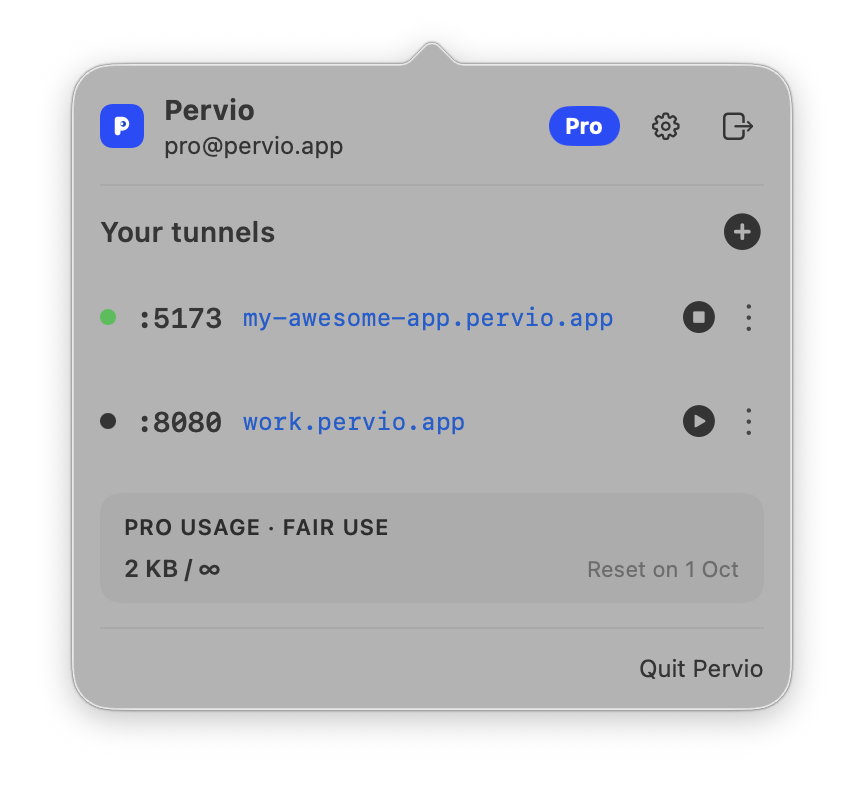
Show the thing you are building
Send a client or teammate a link to the app on your Mac. No staging deploy, no cleanup later.
A small tool for people who build things
Expose your local app with a public HTTPS URL. Share development servers, test webhooks and open localhost from anywhere.
macOS 14+ · Apple silicon and Intel · Free to start
01 / The point
There is already enough software between an idea and the person you want to show it to. Pervio stays in the menu bar, gets out of your way, and leaves you with a URL.
02 / In practice
Send a client or teammate a link to the app on your Mac. No staging deploy, no cleanup later.
Point Stripe, GitHub, or any webhook provider at your local endpoint and keep the real feedback loop.
Open your local server from a phone, tablet, or another machine on the internet.
03 / The deal
The free version is not a demo. It is one real tunnel with real HTTPS and no expiration. Pro is for the day Pervio becomes part of how you work.
€39 once for Pro.
No subscriptions. Fair use applies: we are an indie project and may limit abuse.
04 / By design
A proper macOS app, not a browser tab wearing a desktop costume.
Clear limits on Free. One lifetime price on Pro. No fake urgency.
One useful action: make a local service reachable, then leave you alone.
05 / FAQ
A localhost tunnel gives a local development server a public URL so other people and services can reach it over the internet.
Yes. Free includes one real tunnel, HTTPS and 5 GB of monthly bandwidth. It does not expire and no card is required.
Yes. Run your development server normally, choose its local port in Pervio and share the generated public URL.
Yes. Use the public URL as the endpoint for Stripe, GitHub or another webhook provider while your local app handles the request.
No. Pervio is a native macOS menu bar app. Click the P icon, choose a port and start the tunnel.